


SayHi : Chat Now
4.81.19K Reviews
App Specs
- Version
- 2.7.6
- Updated On
- License
- Free
- Downloads
- 100,000+
- Developer
- Maju bersama
- Categories
- Entertainment
- Platform
- Android
Screenshots





 Analysis by AppCompare
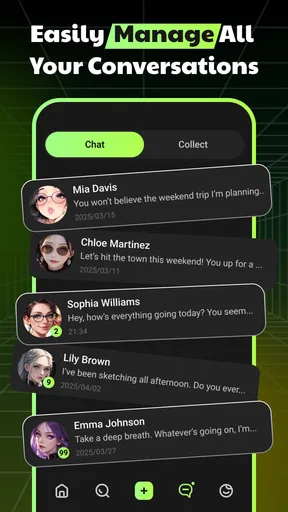
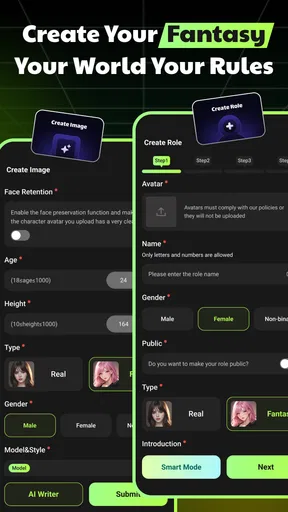
SayHi: Chat Now is the kind of entertainment app I open when I want a conversation that feels more responsive than scrolling through a feed, but less demanding than joining a real-time social space. It combines AI role-play chat with collectible character cards, so the appeal comes from choosing a character, starting a scenario, and seeing how the exchange develops. I found the experience easy to understand within a few minutes, although getting the best results depends heavily on how clearly I guide the conversation.
Developed by Maju bersama, this free app sits in the mature entertainment category and carries a 17+ age rating. It has reached over a hundred thousand installs, with an average rating of 4.8 from around nineteen thousand ratings. Those figures suggest that its central idea connects with a substantial audience, but they do not remove the need to consider what kind of interaction you actually want. This is not a replacement for a messaging app, a professional assistant, or a conventional game with a fixed objective.
How SayHi fits into an everyday routine
My usual starting point is simple: I choose a character card that matches the mood I want, then give the conversation a clear opening instead of typing a vague “hello.” A short prompt with a setting, relationship, and immediate situation produces a more useful first reply. For example, I might establish that two characters are preparing for a difficult journey, or that I want a light conversation after a long day. The more concrete the starting point, the less time I spend correcting the direction later.
This makes the app particularly suitable for short sessions. I can use it for a few minutes while waiting for an appointment, return to a scenario later, or spend longer building a fictional exchange when I have more time. The collectible card element gives the experience a browsing component, but the cards matter mainly because they shape the tone and premise of the chat. I would not approach it expecting a traditional card game with tactical rounds, scoring, or a campaign structure.
A realistic everyday use case is winding down before bed without opening a busy social network. I can select a character, set a calm conversational premise, and keep the exchange focused on storytelling or casual role-play. That is more engaging than passively watching short videos, but it also requires a little self-control: an open-ended conversation can keep going long after the original reason for opening the app has disappeared.
The basic workflow is friendly to newcomers. Pick a card, write a message, read the response, and adjust the direction when necessary. I appreciate that the app does not require me to learn a complicated ruleset before I can enjoy it. At the same time, the simplicity means the quality of the session depends on my input. If I give the AI no context, the conversation can feel generic; if I provide too many instructions at once, the exchange may feel more like managing a script than having fun.
What the character-card idea adds
Character cards give me a practical way to separate different moods and fictional setups. Instead of restarting from a blank chat every time, I can begin with a premise that already suggests how the interaction should feel. This is useful when I want variety without spending several minutes inventing a complete scenario from scratch.
Worth Reading Before You Choose

EA SPORTS FC Mobile 26 Is a Bigger Football Game, but It Takes Time

Flipboard Shows What News Apps Must Do Beyond the Feed

Switching to Android Auto Means Rethinking Your Driving Routine

Google Calendar Makes a Crowded Week Easier to Manage

Ludo King Makes the Most of the Minutes Between Plans

Baby Panda World Brings Quick Play to Modern Phones, but Its Game Library Feels Busy
The trade-off is that novelty can become the main attraction. Browsing cards may be more satisfying than developing one conversation deeply, especially for users who enjoy collecting and sampling personalities. I found the app more rewarding when I treated the cards as starting points rather than destinations. The strongest sessions came from taking one character and adding a specific situation, a goal, or a small conflict.
One habit made a noticeable difference: I kept the opening message focused on one scene. Instead of asking the character to be funny, mysterious, supportive, knowledgeable, and dramatic all at once, I chose one dominant tone and allowed the conversation to evolve. When the reply drifted, I corrected it in a natural sentence rather than rewriting the entire setup. This keeps the exchange conversational and avoids turning every message into a list of commands.
Settings I would check before spending much time
Before settling into regular use, I would inspect the available app settings and the purchase-related areas rather than tapping through them quickly. SayHi is free to install, but it includes in-app purchases ranging from $3.49 to $109.99 per item. That makes it especially important to understand what is optional, what affects access to collectible content, and how the purchase flow is presented on the device you use.
I would also check notification behavior. An AI chat app can become surprisingly intrusive if every update receives permission to interrupt the day. If notifications are useful to you, keeping only the ones that help you return to an active conversation is a sensible approach. If you mainly use the app in short bursts, turning them off may make the experience feel more intentional and reduce the temptation to reopen it without a clear reason.
The mature age rating deserves more than a passing glance. I would not treat it as a guarantee that every conversation will suit every adult, and I would not hand the app to a younger user simply because the interface looks approachable. The rating is a reminder to use personal judgement about the themes you introduce and the kind of role-play you encourage. It is also a reason to avoid treating the AI as a trusted authority in emotionally serious situations.
Device compatibility is fairly broad: the app supports Android 7.0 and later, and its current version is 2.7.6. That helps users with older Android phones try it without needing a recent handset. Still, compatibility alone does not guarantee an equally comfortable experience on every device. Chat apps are easier to use when the keyboard, scrolling, and response display remain smooth, so I would test a normal conversation before committing to long sessions on an older phone.
Small habits that make conversations better
The fastest improvement is to write prompts that behave like scene directions rather than search queries. I get better role-play when I mention who I am in the scene, what has just happened, and what kind of response I want next. A compact instruction such as “keep the tone playful and ask me one question at the end” is more useful than repeatedly complaining that the character feels flat.
I also recommend changing one variable at a time. If a character becomes too serious, I adjust the tone; if the setting is confusing, I restate the location; if the replies become repetitive, I introduce a new event. Changing everything at once makes it difficult to tell what helped. This is an advanced habit in a simple app, but it saves time and makes the chat feel less random.
Another useful pattern is to give the character a short-term objective. A conversation with no direction can circle around the same greetings and reactions. Adding a small goal, such as solving a misunderstanding, preparing for an event, or deciding between two options, gives the exchange somewhere to go. I prefer modest objectives because they leave room for improvisation instead of forcing the AI into a rigid plot.
For repeat use, I would keep a personal set of opening formulas outside the app, such as a quiet conversation, a mystery scene, or a friendly debate. I am not suggesting that SayHi includes a built-in shortcut library; the point is to create a repeatable habit for yourself. Reusing a good structure while changing the character and situation helps reveal which cards genuinely suit your style and which only look interesting at first glance.
When a response misses the point, I avoid arguing with the previous message for too long. A brief correction usually works better: state the fact that should remain true, say what the character should do now, and continue. If the exchange has wandered too far, starting a fresh scenario can be more efficient than trying to repair every detail. That is one of the app’s practical limits: the user often has to manage continuity.
Where the experience is strong, and where it slows down
The strongest part of SayHi is the low barrier between choosing an idea and acting on it. I do not need to prepare a full story or find another person who wants to role-play at the same moment. The character-card format also makes experimentation approachable, especially for users who enjoy fictional personalities and want a more interactive form of entertainment.
Its weakness is the same open-endedness that makes it flexible. An AI role-play chat does not automatically understand the exact emotional rhythm, boundaries, or continuity I have in mind. Replies can require steering, and a promising setup may lose its shape if I stop reinforcing the important details. People who want carefully authored dialogue may prefer a visual novel or story game, where the writing and outcomes are deliberately controlled.
It is also not the best alternative to ordinary messaging. If I want genuine connection, shared memories, or the unpredictability of a friend’s response, a real conversation is better. SayHi can imitate the form of dialogue, but it does not provide the mutual relationship that makes human messaging meaningful. I see it as a private creative pastime, not as a substitute for maintaining real social contact.
The purchase structure is another point to approach carefully. Because the app is free while offering individual purchases, I would decide in advance how much I am comfortable spending and avoid buying simply because a new character or option appears at an appealing moment. The upper end of the listed purchase range is substantial, so users who mainly want casual free entertainment should pay attention to the difference between enjoying the basic chat and collecting more content.
Privacy-minded users should also bring sensible expectations to any AI conversation app. I would avoid entering passwords, financial details, private messages copied from other people, or deeply identifying personal information. Even when a conversation feels informal, it is better to keep role-play fictional and personal disclosures limited. That habit improves peace of mind without reducing the creative value of the app.
Who should try it, and who should skip it
I think SayHi is a good fit for adults who enjoy improvising scenes, testing fictional personalities, and having an interactive distraction that can be started without coordinating with anyone else. It is also appealing to people who like collecting character concepts but want to do more than simply browse them. Writers may find it useful for loosening up with dialogue exercises, provided they treat the replies as brainstorming rather than polished final material.
I would be more cautious recommending it to someone who dislikes steering AI conversations. If you expect every character to remember a complex backstory perfectly or respond with consistently nuanced writing, the app may feel frustrating. Users looking for a competitive game, a structured progression system, or a dependable factual assistant should choose a different type of app instead.
It is also a poor fit for anyone who wants a completely free experience with no reason to think about optional spending. The free entry point is attractive, but the presence of purchases means I would not describe the whole experience as free from monetization pressure. My advice is to enjoy the basic workflow first and only consider spending after deciding whether the conversations themselves hold your interest.
My verdict after using the full workflow
SayHi: Chat Now works best when I approach it as a flexible role-play playground rather than an intelligent friend, a conventional game, or a replacement for social life. The combination of AI conversation and collectible character cards makes starting easy, while the quality of the session depends on practical habits: define one scene, give the character a short-term goal, correct drift briefly, and restart when a conversation has become too tangled.
I like that the app can fit both a five-minute break and a longer creative session. I also like that its mature positioning is clear and that it supports Android versions as old as 7.0. The limitations are real: continuity can require work, open-ended chats can become repetitive, and the purchase range deserves careful attention. Those are not deal-breakers for me, but they should shape expectations before installation.
After its release on Apr 23, 2025, the app has built a strong audience response, and version 2.7.6 gives users a current entry point. My recommendation is straightforward: try it if you enjoy character-driven improvisation and are willing to guide the AI. The best results come from treating each card as a creative tool, not as a promise of effortless conversation. If you want authored stories, human connection, or a fully structured game, another option will serve you better; if you want a quick, personal role-play session with room to experiment, SayHi is worth exploring.
Pros
- Supports voice and text translation for natural conversations.
- Covers a broad selection of languages and regional dialects.
- Simple interface makes it quick to start a translated chat.
- Useful for travel
- meeting people
- and cross-language messaging.
- Conversation history helps review previous translated exchanges.
Cons
- Translation quality can vary with accents
- slang
- and complex sentences.
- Some features may require an internet connection to work properly.
- Voice recognition can struggle in noisy surroundings.
- Privacy-conscious users may dislike relying on cloud-based translation.
- The free experience may include ads or limits on certain features.
FAQs for SayHi : Chat Now
What is SayHi: Chat Now, and what can I use it for?
SayHi: Chat Now is a language translation app designed to help people communicate across language barriers. You can speak or type a phrase, choose the source and target languages, and receive a translated result that can be read aloud. It is useful for travel, casual conversations, learning basic expressions, and quickly understanding short messages when you do not share the same language as another person.
Does SayHi: Chat Now support voice conversations and spoken translations?
Yes. One of the app’s main features is voice-based translation. You can say a sentence into the microphone, allow the app to recognize your speech, and have the translation displayed and spoken in the selected language. In my testing, speaking clearly and using short sentences produced the best results. Background noise, accents, fast speech, and slang may reduce accuracy, so important information should always be confirmed.
Does SayHi: Chat Now require an internet connection to work?
SayHi: Chat Now generally relies on an internet connection to process translations, particularly for voice recognition and spoken output. This means it may not work reliably in airplane mode or in areas with weak mobile coverage unless the app specifically provides an offline option for your device and language pair. Before traveling, test the languages you need and consider keeping essential phrases available as a backup.
Which languages can I translate with SayHi: Chat Now?
The app supports a broad selection of languages and dialects, making it suitable for many common travel and communication situations. However, availability can vary depending on the platform, app version, and whether you are using text, speech recognition, or audio playback. Before downloading, check the current language list in the App Store or Google Play listing, especially if you need a less widely supported language.
Is SayHi: Chat Now accurate enough for important conversations?
SayHi: Chat Now is convenient for everyday phrases, directions, restaurant orders, introductions, and general travel communication, but it should not be treated as a professional interpreter. Translation quality can change with context, regional expressions, pronunciation, and sentence complexity. Avoid relying on it alone for legal, medical, financial, or emergency conversations. For sensitive situations, use a qualified human translator or verify the result carefully.


